







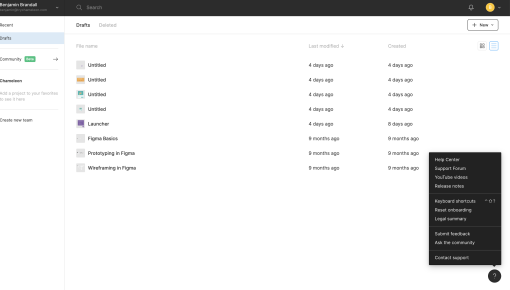
Figma Launcher
In-app launcher to offer help resources, link to feature releases, and solicit feedback
Existing customer? Sign in
Keep users informed about new features, improvements, and important updates directly within your app, helping them discover and adopt the latest changes without leaving their workflow. Organize updates into clear sections so users can quickly see what's new, explore enhanced tools, and stay connected with your team's progress.
Product teams ship features constantly, but here's the problem: most users never discover them. Email announcements get buried in inboxes, blog posts go unread, and social media updates reach only a fraction of your user base. Meanwhile, your carefully crafted features sit unused, adoption rates stagnate, and your development investment fails to drive meaningful engagement.
In-app release notes widgets solve this discovery gap by delivering product update announcements directly within your application interface. Unlike external communications, these contextual notifications reach users at the perfect moment—when they're actively engaged with your product and ready to explore new capabilities.
This template provides a proven structure for effective in-app release notes, featuring three core components: Updated Templates for feature improvements, AI-powered copy enhancements, and team announcements. When implemented correctly, this approach drives measurable increases in feature adoption and user engagement while reducing the friction between product updates and user discovery.
An in-app release notes widget is a contextual overlay or sidebar that appears within your product interface to communicate recent updates, new features, and important announcements. Unlike emails that compete for attention in crowded inboxes or blog posts that require users to navigate away from your product, these widgets deliver information precisely when and where users need it most.
The most effective approach uses a "What's new?" heading that taps into natural human curiosity. Users instinctively want to know about improvements to tools they rely on, making this framing psychologically compelling and engagement-friendly.
The template structure includes three distinct sections that organize information by relevance and urgency:
🆕 Updated Templates highlights feature improvements and new capabilities that directly impact user workflows. This section focuses on functional enhancements that users can immediately apply to their current tasks.
✨ AI-powered copy showcases tool enhancements and automation features that improve efficiency or unlock new possibilities. These updates often represent significant value additions that warrant prominent placement.
🎺 Announcements covers team updates, company news, and broader context that builds community and transparency without overwhelming users with feature-focused content.
This approach delivers higher visibility than external communications, better timing than scheduled emails, and reduced user friction compared to navigating to separate announcement pages. Users can quickly scan updates, dive deeper into relevant features, and return to their workflow without disruption.
Chameleon's Launcher feature enables persistent access to release notes through a subtle, always-available interface element. Advanced targeting capabilities ensure relevant user segments see appropriate announcements, while comprehensive analytics track engagement patterns and integrations with analytics tools can allow you to report on feature adoption rates following each update.
Setting up effective in-app release notes requires strategic planning across content, design, and targeting dimensions. Start by identifying your update frequency and content types—most successful implementations publish updates bi-weekly or monthly, balancing information value with user experience.
Planning Phase Determine what qualifies as announcement-worthy. Major feature launches, significant improvements, and workflow enhancements typically warrant inclusion, while minor bug fixes or backend updates may not. Establish content ownership between product, marketing, and engineering teams to ensure consistent quality and timing.
Design Considerations Choose optimal placement based on your product interface and user behavior patterns. Corner launchers work well for persistent access without disrupting workflows, while modal overlays create higher visibility for critical announcements. Consider visual hierarchy—use emojis and icons to enable quick scanning, and maintain consistent styling that aligns with your product design system.
1. Choose placement strategy: Corner launcher for ongoing access or modal overlay for high-priority announcements 2. Configure trigger conditions: Set rules based on login frequency, feature usage patterns, or user segments to ensure relevant timing 3. Create content sections: Use the three-part template structure to organize updates by type and importance 4. Set up engagement tracking: Implement analytics to measure click-through rates, feature adoption, and user journey progression 5. Schedule content updates: Establish regular publishing cadence and content review processes
Content Creation Guidelines Write compelling headlines that clearly communicate value propositions. Keep descriptions under 50 words for quick consumption, and use action-oriented language that encourages exploration. Include clear next steps or calls-to-action that guide users toward trying new features.
Segmentation Strategy Target announcements based on user behavior, subscription tiers, or feature usage patterns. Power users might appreciate advanced feature updates, while newer users benefit from foundational improvements and onboarding enhancements.
Chameleon's Interactive Demos can showcase new features directly within release notes, allowing users to experience functionality before committing time to exploration. Integration with Tours enables guided feature discovery, while Tooltips provide follow-up engagement to drive sustained adoption beyond initial announcement viewing.
Timing determines the success of your in-app release notes more than any other factor. Display announcements during natural engagement moments—immediately after login, when users access relevant feature areas, or during workflow transitions. Avoid interrupting focused work sessions or critical user actions.
Frequency Management Balance information sharing with user experience by maintaining consistent but not overwhelming update schedules. Most users appreciate bi-weekly or monthly updates, but avoid announcement fatigue by prioritizing truly valuable information over comprehensive feature lists.
Content Guidelines Focus on benefits rather than technical specifications. Instead of "Added API endpoint for data export," write "Export your data faster with our new bulk download feature." Users care about outcomes and improvements to their workflows, not implementation details.
Use scannable formatting with clear visual hierarchy. Emojis and icons help users quickly identify relevant sections, while consistent styling creates professional presentation. Keep individual update descriptions concise—aim for one to two sentences that communicate value and next steps.
Personalization Strategies Tailor announcements to user segments based on subscription levels, feature usage, or role-based needs. Enterprise customers might appreciate advanced integration updates, while individual users benefit from productivity enhancements and ease-of-use improvements.
Visual Design Elements Maintain visual consistency with your product interface while ensuring announcements stand out enough to capture attention. Use white space effectively, choose readable fonts, and ensure color contrast meets accessibility standards.
Follow-up Actions Include clear calls-to-action that guide users toward feature exploration. "Try it now," "Learn more," or "See examples" provide specific next steps that convert announcement views into feature adoption.
Chameleon's advanced targeting capabilities enable sophisticated personalization based on user behavior patterns, ensuring each announcement reaches the most relevant audience segments at optimal moments for engagement and adoption.
Effective measurement starts with defining clear success metrics that align with your product adoption goals. Track click-through rates on individual announcements to understand which updates generate the most interest, and monitor feature adoption rates following release note publications to measure actual business impact.
Key Performance Indicators Monitor announcement engagement rates, time spent viewing updates, and progression from announcement viewing to feature trial. Track user segments that show highest engagement to inform future targeting strategies.
User Journey Analysis Analyze the complete path from announcement viewing to feature adoption. Identify drop-off points and optimization opportunities in the discovery-to-usage funnel.
Feedback Integration Collect user feedback on announcement frequency, content relevance, and format preferences. Use surveys or direct feedback mechanisms to understand user preferences and adjust your approach accordingly.
Chameleon's comprehensive analytics dashboard and integrations with product analytics tools like Heap, Mixpanel, and Amplitude provide detailed insights into announcement performance, user journey tracking from initial viewing to feature adoption, and segmentation analysis that enables targeted improvements based on user behavior patterns.
How often should we update our in-app release notes? Most successful implementations publish updates bi-weekly or monthly. The key is consistency rather than frequency—establish a regular schedule that users can anticipate while ensuring each update provides genuine value.
What's the ideal length for release note descriptions? Keep individual update descriptions under 50 words for optimal scanning and comprehension. Focus on benefits and clear next steps rather than comprehensive feature explanations.
Should we announce every product update? No. Prioritize updates that directly impact user workflows, provide significant value, or require user action. Minor bug fixes and backend improvements typically don't warrant announcement space.
How do we avoid notification fatigue? Maintain consistent publishing schedules, prioritize high-value updates, and use targeting to ensure relevant users see appropriate announcements. Monitor engagement metrics and adjust frequency if you notice declining interaction rates.
Can we customize the template design? Yes. While the three-section structure provides proven organization, visual design should align with your product interface and brand guidelines. Maintain consistency while ensuring announcements capture appropriate attention.
How do we measure the impact of our announcements? Track engagement metrics like click-through rates and time spent viewing, but focus primarily on feature adoption rates and user journey progression following announcement publication. These metrics demonstrate actual business impact rather than just engagement.

Get started free in our sandbox or book a personalized call with our product experts
