








Arcade's Onboarding Checklist
Arcade nails onboarding by turning what could be a maze into a guided walk in the park. Their checklist...
Existing customer? Sign in
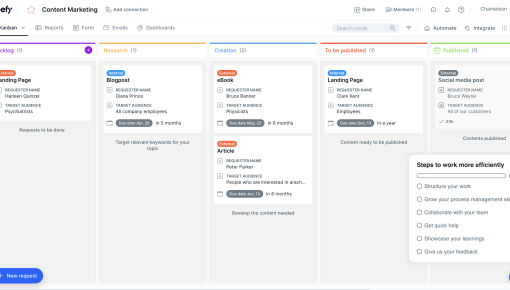
Guide new users through four key steps—watching a welcome video, learning core features, creating their first experience, and inviting teammates—to help them quickly understand and start using your product effectively.
Did you know that 90% of users who don't complete key onboarding actions within their first session never return? This staggering statistic reveals why most SaaS products struggle with user activation—their onboarding experiences fail to guide users to value quickly enough.
The problem isn't just poor design; it's the lack of structure. New users often feel overwhelmed by feature-rich products without clear direction on what to do first. They abandon the product before experiencing its core value, leading to high churn rates and missed growth opportunities.
Enter the in-app onboarding checklist: a structured, interactive guide that transforms chaotic first experiences into clear pathways to success. Our proven 4-step checklist template helps product teams reduce time-to-value while increasing user activation rates through strategic task sequencing and progress visualization.
An in-app onboarding checklist is an interactive, step-by-step guide embedded directly within your product interface that helps new users complete essential setup tasks. Unlike traditional onboarding flows that users experience once and forget, these checklists remain accessible throughout the user onboarding process, providing ongoing guidance when needed.
Key characteristics of effective onboarding checklists include:
- Visual progress tracking that shows completion status at a glance - Bite-sized, actionable tasks that prevent user overwhelm - Embedded interface integration that doesn't disrupt the natural product experience - Gamified completion experience with celebrations and rewards
For product teams, in-app onboarding checklists deliver measurable business impact. They reduce time-to-value for new users by providing clear next steps, increase feature adoption rates through guided exploration, and offer concrete onboarding metrics for optimization. Most importantly, they scale personalized guidance without requiring human intervention, making them essential product team resources for growing SaaS companies.
The interactive onboarding approach transforms passive users into active participants, creating engagement from the first session while building confidence through structured achievement.
Our "Get started! 🚀" template provides a proven framework that balances comprehensive onboarding with user-friendly simplicity. This user onboarding checklist template focuses on four critical activation moments that drive long-term engagement.
Step 1: Welcome Video The personal introduction builds immediate connection between users and your product. This isn't just feature explanation—it's relationship building. A brief welcome video from your founder or product team creates trust while setting expectations for the onboarding experience design.
Step 2: Learn About Core Features Rather than overwhelming users with every capability, this step focuses on your product's primary value proposition. Interactive product tours or demos let users explore functionality hands-on, making abstract benefits tangible through direct experience.
Step 3: Create Your First Experience This is your "aha moment" step—where users complete a meaningful action that demonstrates real value. Whether it's creating a project, sending a campaign, or analyzing data, this hands-on task transforms users from observers to active participants.
Step 4: Invite Your Teammates Social proof and team adoption create stickiness beyond individual use. When users invite colleagues, they're investing in your product's role within their organization, significantly increasing retention likelihood.
Chameleon Implementation Strategy: - Deploy Launcher for persistent checklist access without interface clutter - Use Interactive Demos for safe feature exploration in Step 2 - Create Tours for guided walkthroughs during complex setup tasks - Implement Tooltips for gentle task reminders without being pushy
This SaaS onboarding checklist structure works because each step builds upon the previous one, creating momentum toward full product adoption.
Planning Phase Before building your checklist, identify your product's "aha moment"—the specific action where users first experience core value. Map the critical activation actions that lead to this moment, then prioritize tasks by their impact on user success and implementation effort required.
Successful product adoption strategies start with understanding user motivations. What job are they hiring your product to do? Which features directly support that job? Your checklist should create the shortest path between signup and value realization.
Implementation with Chameleon Chameleon's no-code approach makes checklist deployment straightforward. Configure the Launcher with your checklist items, ensuring persistent visibility without overwhelming the interface. Create supporting Tours for each step, providing contextual guidance exactly when users need it.
Set up progress tracking and analytics to measure completion rates, identify drop-off points, and understand user behavior patterns. Design completion celebrations that acknowledge user progress—small wins create motivation for continued engagement.
Customization Tips Tailor tasks to different user segments based on role, company size, or use case. A marketing manager's checklist differs significantly from a developer's onboarding needs. Adjust task complexity based on user technical expertise.
The key is balancing comprehensiveness with simplicity—provide enough guidance to ensure success without creating cognitive overload.
Keep It Focused Limit your product onboarding checklist to 3-5 essential tasks maximum. Research shows completion rates drop dramatically beyond five items as users experience decision paralysis. Each task should directly contribute to user activation—if it doesn't drive immediate value, save it for later engagement campaigns.
Make Progress Visible Clear completion indicators satisfy users' psychological need for achievement while providing motivation to continue. Progress bars, checkmarks, and percentage completion create positive feedback loops that encourage task completion.
Provide Immediate Value Every checklist item should deliver tangible benefit upon completion. Users should feel more capable, informed, or successful after each step. This immediate gratification creates positive associations with your product and builds momentum for continued use.
Enable Easy Access Position your checklist through persistent launcher or sidebar placement, ensuring users can return to guidance without hunting through menus. The onboarding launcher should be discoverable but not intrusive, available when needed but dismissible when not.
Celebrate Completion Acknowledge user progress with celebrations, badges, or unlocked features. These micro-rewards create positive emotional connections while reinforcing the value of completed actions.
Measure and Iterate Track completion rates, time-to-completion, and correlation with user activation metrics. Use this data to optimize task order, messaging, and complexity. The best onboarding checklist best practices emerge from continuous testing and refinement.
Role-Based Checklists Different user types require different onboarding paths. Administrators need setup and configuration guidance, while end users focus on daily workflow tasks. Create targeted checklists that speak directly to each role's responsibilities and success metrics.
Feature-Specific Onboarding Deploy specialized checklists when launching new features or capabilities. These focused guides help existing users adopt new functionality without overwhelming them with information they already know.
Seasonal Campaigns Update checklists for product updates, seasonal features, or time-sensitive opportunities. This keeps your onboarding fresh while highlighting relevant capabilities.
Team Onboarding Collaborative setup tasks that involve multiple team members create shared investment in your product's success while ensuring comprehensive adoption across organizations.
How many items should an onboarding checklist include? 3-5 items deliver optimal completion rates. More items can overwhelm new users and reduce overall completion. Focus on essential activation tasks rather than comprehensive feature coverage.
Should the checklist be mandatory or optional? Optional with persistent visibility works best. Users appreciate choice while maintaining access to guidance. Forced completion often creates negative first impressions and user resistance.
How do you measure checklist effectiveness? Track completion rates, time-to-completion, and correlation with user activation metrics. Monitor which steps cause drop-offs and optimize accordingly. The most important metric is how checklist completion correlates with long-term user engagement.
Can you customize the checklist for different user segments? Yes, Chameleon allows dynamic content based on user properties and behaviors. Segment by role, company size, use case, or technical expertise to deliver personalized onboarding experiences that resonate with specific user needs.
What happens after users complete the checklist? Transition to advanced features, ongoing engagement campaigns, or success milestone celebrations. The checklist is just the beginning—use completion as a trigger for deeper product adoption initiatives and continued user engagement tactics.
Effective user engagement tactics extend beyond initial onboarding, creating ongoing value through progressive disclosure and advanced feature introduction. Your checklist completion should mark the beginning of a longer-term relationship, not the end of guided assistance.
Get started free in our sandbox or book a personalized call with our product experts
